A tooltip
Some main content
            .foo { color: #000000; }
            .foo .bar { color: #fd2020; }
            .foo .bar > .baz { color: #ffffff; }
            .foo {
              color: #000000;
              & .bar {
                color: #fd2020;
                & > .baz {
                  color: #ffffff;
                }
              }
            }
          .a { color: #00c2cb; }
          .a:hover { color: #3498db; }
          .a {
            color: #00c2cb;
            &:hover {
              color: #3498db;
            }
          }
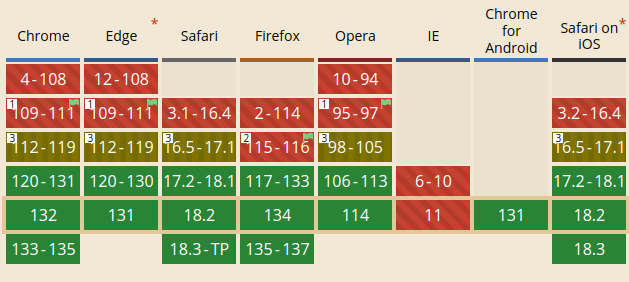
~92%
              .wrapper {
                display: flex;
                width: 100%;
              }
              .image {
                aspect-ratio: 1;
                background-color: aqua;
              }
              .details {
                background-color: bisque;
              }
                Image


                Title

                  Description
Description
Description
        .wrapper { flex-direction: column; }
        .image {
          order: 2
        }
        .details {
          display: contents;
          h2 {
            order: 1;
          }
          p {
            order: 3;
          }
        }
           Image


           Title

             Description
        Header


          A tooltip

        Some main content
    header {
      position: relative;
      z-index: 2;
    }
    main {
      position: relative;
      z-index: 1;
    }

    .tooltip {
      position: absolute;
      z-index: 999999;
    }
Some main content
        Header


          A tooltip

        Some main content
    header {
      position: relative;
      z-index: 2;
    }
    main {
      position: relative;
      z-index: 1;
    }

    .tooltip {
      position: absolute;
      z-index: 999999;
    }
Some main content
      .block_flex {
        display: block flex;
      }

      .inline_flex {
        display: inline flex;
      }
The primary input mechanism includes an accurate pointing device, such as a mouse.
The primary input mechanism includes a pointing device of limited accuracy, such as a finger on a touchscreen.
      @media (pointer: fine) {
        input[type="checkbox"] {
          width: 15px;
          height: 15px;
          border-width: 1px;
        }
      }

      @media (pointer: coarse) {
        input[type="checkbox"] {
          width: 30px;
          height: 30px;
          border-width: 2px;
        }
      }
        :root { --bg: 20px;}

        p, div {
          background-color: red; border: 1px solid green;
        }

        p {
          background-color: var(--bg);
        }

        div {
          background-color: var(--other);
        }
p tag